About WiFi Analyzer: Channel Scanner
WiFi Analyzer turns your phone into a pocket Wi-Fi scanner and signal meter. See every network around you, find the least crowded channel, and get the strongest, most stable connection in any room. Whether you are setting...
WiFi Analyzer turns your phone into a pocket Wi-Fi scanner and signal meter. See every network around you, find the least crowded channel, and get the strongest, most stable connection in any room.
Whether you are setting up a new router, hunting down dead zones at home, or troubleshooting a slow connection, WiFi Analyzer gives you the data you need at a glance.
WHAT YOU CAN DO
• Scan all nearby WiFi networks and compare their signal strength
• See every channel rated at a glance and find the best, least crowded channel for your router on 2.4 GHz, 5 GHz and 6 GHz
• Share a channel report with the recommended channels for every band
• Watch signal strength change over time on a live timeline graph
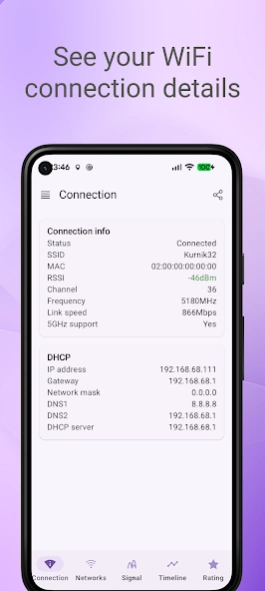
• Inspect your current connection in detail: SSID, MAC, RSSI, frequency, channel, IP, DHCP and DNS
• Read a clear signal-quality indicator so you know when a connection is reliable
FIND NETWORKS FAST
• Filter networks by name or band (2.4 GHz / 5 GHz / 6 GHz)
• Hide weak or hidden networks to focus on what matters
• Smart, stable sorting keeps the list steady instead of jumping as signals fluctuate
WI-FI 6, 6E AND 7
• Instantly see each network's Wi-Fi generation — Wi-Fi 4, 5, 6, 6E and 7
• Full 6 GHz band support: scan, graph and rate 6 GHz channels on Wi-Fi 6E and Wi-Fi 7 devices
EXTRA TOOLS
• Share any WiFi network as a QR code — others just scan to connect, no password typing
PING & CONNECTION TESTING
• Test devices, routers and websites with the built-in ping tool
• Choose the echo count, reuse recent targets and stop a running test at any time
• Review sent and received packets, packet loss and response-time statistics after each completed run
DESIGN
• Clean Material Design 3 interface
• Light and dark theme
PERMISSIONS
• Precise location — required by Android to scan for nearby WiFi networks. The app does not collect or share your location.
ANDROID 9 (PIE) AND NEWER
Previous Versions
Here you can find the changelog of WiFi Analyzer: Channel Scanner since it was posted on our website on 2023-07-03 19:11:37.
The latest version is 1.11.2 and it was updated on 2026-10-10 07:30:34. See below the changes in each version.
WiFi Analyzer: Channel Scanner version 1.11.2-gp
Updated At: 2026-10-08
Changes: What's new in 1.11.0
• Stop a ping test while it runs
• Choose the echo count and quickly reuse recent targets
• See your current connection and each completed run's packet-loss and response-time statistics
• Bug fixes and improvements
WiFi Analyzer: Channel Scanner version 1.10.2-gp
Updated At: 2026-08-16
Changes: What's new in 1.10.0
• Wi-Fi 6, 6E and 7 support: instantly see each network's generation
• Full 6 GHz band support — scan, graph and rate 6 GHz channels on Wi-Fi 6E / Wi-Fi 7 devices
• Bug fixes and improvements
WiFi Analyzer: Channel Scanner version 1.9.1-gp
Updated At: 2026-07-22
Changes: What's new in 1.9.0
• New Channel Rating tab: see every WiFi channel rated at a glance and get the best, least crowded channel for your router on 2.4 GHz and 5 GHz
• Share a channel report with the recommended channels for both bands
• Bug fixes and improvements
WiFi Analyzer: Channel Scanner version 1.7.1-gp
Updated At: 2026-06-18
Changes: Bug fixes and stability improvements
WiFi Analyzer: Channel Scanner version 1.4.6
Updated At: 2023-08-22
Changes: * Android 7 is now required
* Minor bug fixes and stability improvements
WiFi Analyzer: Channel Scanner version 1.4.4
Updated At: 2022-08-26
Changes: * Support for Android 13
* Support for 🇺🇦 ,🇨🇿, 🇹🇷 lang
* Bug fixes and stability improvements
Disclaimer
Official Google Play Link
We do not host WiFi Analyzer: Channel Scanner on our servers. We did not scan it for viruses, adware, spyware or other type of malware. This app is hosted by Google and passed their terms and conditions to be listed there. We recommend caution when installing it.
The Google Play link for WiFi Analyzer: Channel Scanner is provided to you by apps112.com without any warranties, representations or guarantees of any kind, so access it at your own risk.
If you have questions regarding this particular app contact the publisher directly. For questions about the functionalities of apps112.com contact us.